

Being on the job hunt again, I was keen to keep my hands dirty and be able to share as an example of AI use in interviews.
When I left Goodnotes last week, I decided to do something to focus the mind and give me something to look at in the lull of job applications and interviews.
For years I’ve been managing my podcast backlog by scrolling through Apple Podcasts hoping the next episode would present itself : except the list never held everything in view at once. I’ve been choosing my next book by downloading a spin wheel app and eliminating options one by one until one survived. I’ve been playing my entire 35,000 song Apple Music library on shuffle and hoping for the best. And I’ve been writing tasks on literal Post-it notes. Each problem solved with a different tool, none of them talking to each other, and all of them adding to the low-level decision fatigue that anyone who suspects they might be neurodivergent will recognise immediately.
I wanted a solution to this. Not buy a productivity app. Not try yet another system. I decided to build exactly the tool I actually needed, using Claude as a collaborator. This is the story of how that went.
Four days in, Focus ND is my most opened app. That’s the only metric that matters.
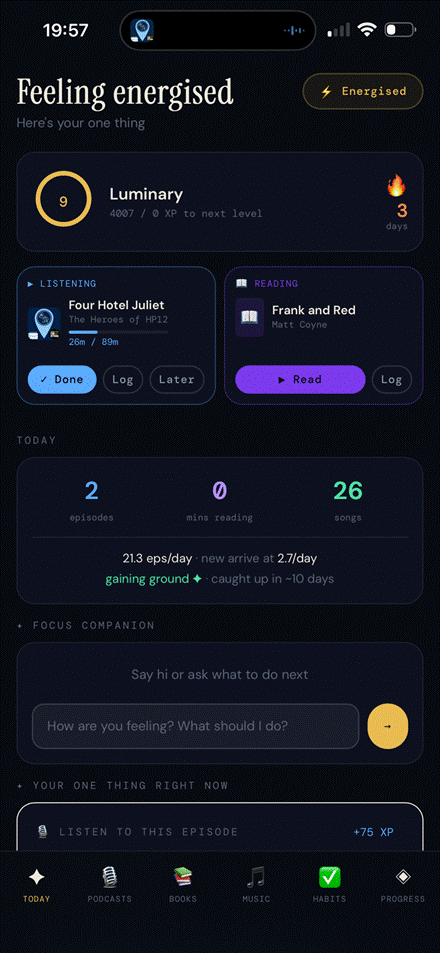
The Today tab : mood set, currently listening and reading side by side, daily stats and AI companion below
The Problem With Existing Tools
Most productivity apps are built for a neurotypical user who can process information quickly, make decisions easily, and maintain consistent habits without friction. For neurodivergent people : and I’m speaking as someone who self-identifies with ADHD and autism traits, without a formal diagnosis, these apps often create more cognitive load than they remove.
The specific friction I kept hitting:
- 191 podcast episodes in my backlog. The only way to see it was scrolling through Apple Podcasts, which never showed the full list at once. No sense of progress, no way to prioritise, no way to know how far behind I was.
- Choosing what to read next was paralysing. I used a spin wheel app : eliminating books one by one until one survived. It worked, but I had to manually remove books once read and add new ones when bought. No history, no intelligence, just a list I maintained by hand.
- 35,000 songs in Apple Music played on shuffle. Not curated, not mood-aware, just chaos.
- My mood completely changes what kind of media I want to consume, but no app accounted for that.
- Tasks and reminders lived somewhere completely separate from any of this.
What I actually needed was one place that knew everything and helped me answer the question: “Given how I’m feeling right now, what should I do next?”
The Prompt That Started It
Here is the exact message I sent to Claude on 16 March 2026:
“I want to build an iOS app that can link to my Apple Music library to enable to offer suggestions on what albums from my library I should listen to. I also want it plugged into Apple Podcasts to keep track of my backlog of episodes still to be listened to (I’m currently 3 months behind new episodes with a backlog of 100+ episodes across my favourite shows). Also I’d like it to link to my Goodreads ‘books at home’ shelf to suggest a book I should read next when finished my current read at the press of a button. Currently I use an app to spin a wheel to choose. This all links to my neurodivergent way of thinking and would like this app to help with my decision making and task management day to day too.”
No wireframes. No technical specification. No prior experience building apps. Just a clear description of a real problem and a honest explanation of why it mattered.
Ten days later the app has 3,181 lines of code, 114 functions, 77 unit tests, 35 end-to-end tests, and is the most opened app on my phone. The initial scope shifted as we built it: Goodreads has no public API so books became manual, Apple Music became Last.fm, and the iOS app became a PWA. But the core problem statement never changed.
I want to be clear about what this project is and isn’t. It’s not “I used AI to write code for me.” It’s closer to having a senior developer on call who never gets tired, never judges the question, and brings genuine engineering knowledge to every decision.
The conversations ranged from product decisions (“should this be a companion app or try to do playback?”) to technical architecture (“why are my books disappearing after 30?”) to test strategy (“how do we identify which functions are worth testing?”). Claude pushed back when my ideas were unclear, suggested alternatives I hadn’t considered, and flagged risks before they became problems.
The result is an app that was built for me, by me, with genuine collaboration. Every feature decision was mine. Every piece of code was reviewed by me. But I couldn’t have done it at this pace or quality alone.
What We Actually Built
Focus ND is a Progressive Web App : a single HTML file, 3,181 lines, 114 functions : that runs in any browser and installs on your home screen like a native app. No app store, no subscription, no backend. Your data lives on your device.
The core features:
- Podcast backlog manager : oldest episodes first, backlog trend tracking, pace vs arrival rate, audio age of your oldest unheard episode
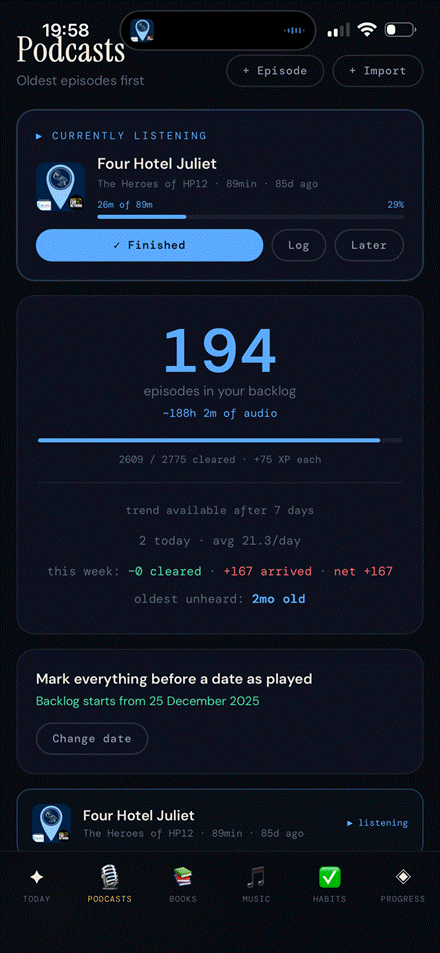
Podcasts tab : currently listening with progress, backlog stats showing pace and net change
- Book shelf with spin wheel : books stay on the shelf until you finish them, the wheel only spins eligible ones, and finished books are tracked automatically. No more manual list maintenance.
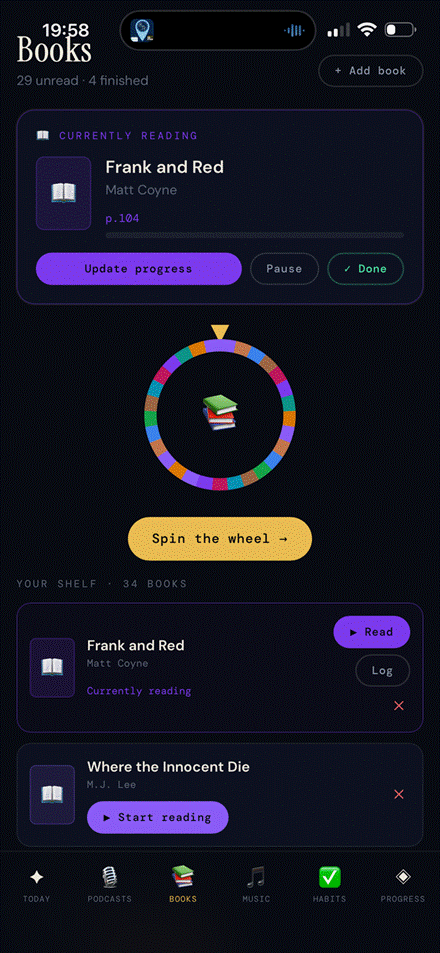
Books tab : currently reading with progress, the spin wheel, and the full shelf below
- Music integration via Last.fm : weekly digest powered by Claude AI, period selector, scrobble count on the Today tab
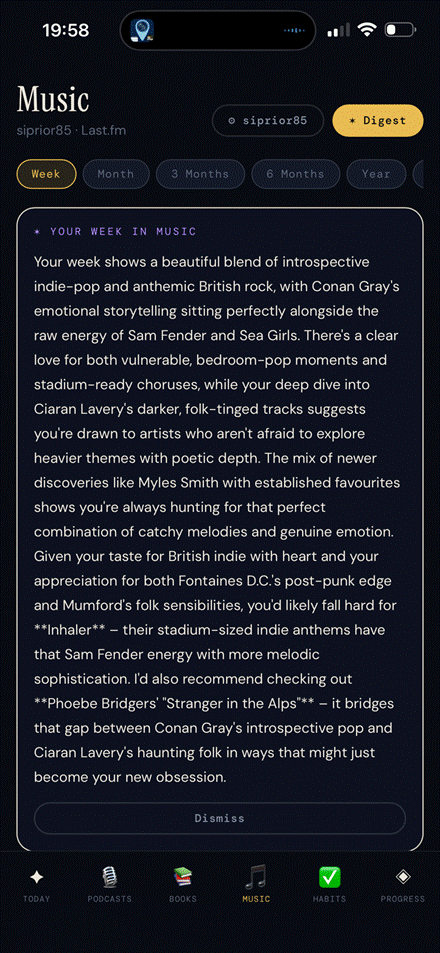
Music tab : AI digest with a genuine read on the week’s listening and tailored recommendations
- AI companion on the Today tab : knows your mood, your backlog age, what you’re mid-episode on, and gives short warm nudges rather than essays
- Habits and to-do list : on a separate tab, daily reset at midnight, overdue highlighting
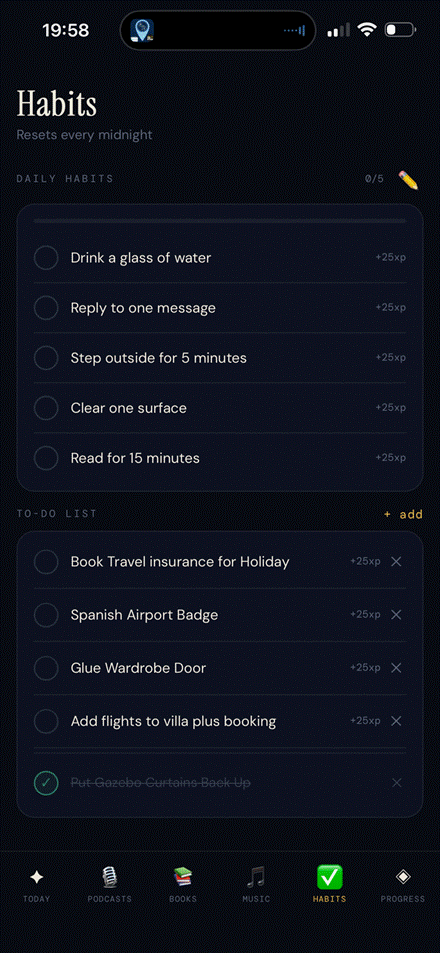
Habits tab : daily habits with XP rewards, to-do list with the “post-it note” tasks
- Weekly history on the Progress tab : bars showing episodes and reading minutes per week, backlog trend
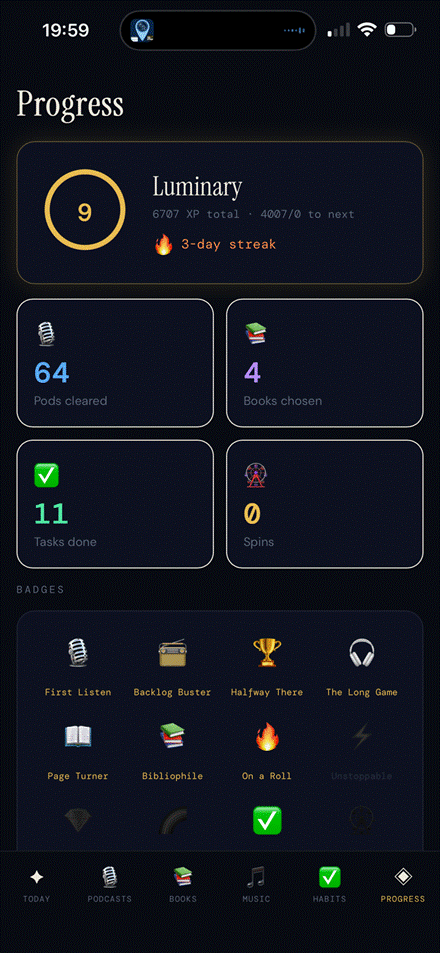
Progress tab : level 9 Luminary, 6,707 XP, 64 episodes cleared, badges earned
- Gamification : XP, levels, badges, streaks. Surprisingly motivating.
The Today tab is the heart of it. Every time I put my phone down after finishing a podcast episode, I open it and it tells me what to do next based on my mood.
The Testing Story
This is the part that shouldn’t surprise people. We didn’t just build the app, we built a proper test suite alongside it. I pushed and probed Claude on a full test plan and focus of ensuring it all worked as expected.
The approach came from asking a straightforward question: what has actually broken, and what would have caught it? The book data loss bug : where adding too many books with cover images would silently wipe the most recently added ones due to localStorage filling up : was exactly the kind of subtle, data-destructive bug that a test would have caught immediately.
We ended up with:
- 77 QUnit unit tests covering pure logic functions : level calculations, session timer formatting, backlog sorting, week history accumulation, the base64 image stripping that fixed the book loss bug
- 35 Playwright end-to-end tests covering critical paths : mood selection, marking episodes done, adding books, data persistence across reloads, localStorage quota protection
- A formal test plan document mapping the 108 functions in the app across three layers: pure logic (QUnit), DOM rendering (Playwright P1-P3), and async API calls (Playwright with mocking)
The tests also taught me something about the app. When I wrote the XP test and it failed because the value was 125 instead of 75, I learned that marking your very first episode done gives you 75 XP plus 50 XP for the First Listen badge. That’s correct behaviour : I just hadn’t consciously designed it that way. The test made the system legible.
What Neurodivergent-Friendly Actually Means in Practice
I want to be specific about this because “neurodivergent-friendly” gets thrown around a lot without substance. I don’t have a formal diagnosis, but I’ve built this for myself and people like me : people who find decisions exhausting, who lose track of things that live in multiple places, and who need a system that meets them where they are rather than demanding consistency they don’t always have.
In Focus ND it means:
- One thing at a time. The Today tab surfaces a single focus item based on your mood, not a list of everything you could do.
- Mood-first navigation. Before you see anything else, you tell the app how you’re feeling. Everything else flows from that.
- Progress framing over deficit framing. The backlog shows “↓ 23 fewer than 7 days ago” rather than just “191 episodes.” You cleared 2,437 episodes. That number is front and centre on the Progress tab.
- Friction removal for decisions. The spin wheel for books, the oldest-first podcast queue, the AI companion nudge. Every feature is trying to eliminate the “what should I do” paralysis.
- Gentle gamification. XP and streaks are there, but the app never shames you for a missed day or a stalled backlog. It celebrates what you did, not what you didn’t.
What I’d Do Differently
A few honest reflections:
Start with tests earlier. We retrofitted tests onto an existing app. It worked, but writing tests as you build forces you to think about function boundaries and side effects upfront. The book data loss bug would have been caught on day one if we’d had tests from day one.
localStorage has real limits. I lost books twice because cover images stored as base64 blobs filled the 5MB limit. The fix was straightforward once we understood the problem : store URLs not blobs, strip base64 on save : but it took longer to diagnose than it should have. For a production app I’d use Supabase from the start.
The companion app positioning is correct. I considered building podcast playback into the app. I’m glad I didn’t. The app is more valuable as a decision layer that sits on top of Overcast and Spotify than as a competitor to them. Knowing your lane early saves a lot of wasted effort.
Is This Something Others Could Use?
Honestly, yes : with caveats.
The core problem it solves (decision fatigue around media consumption, specifically for neurodivergent people) is real and underserved. The feature set is genuinely different from anything on the App Store. The AI companion with real context about your media habits is something I haven’t seen anywhere else.
But it would need proper cross-device sync before I’d put it in front of strangers. Right now your data lives in your browser’s localStorage, which means it’s tied to one device. The export/import feature provides a safety net, but it’s not the seamless experience a wider audience would expect.
The path would be: Supabase for storage, Capacitor to wrap it as a native iOS/Android app, App Store submission. That’s a 3-6 month project if taken seriously. For now I’m building it for myself, and that’s exactly the right approach.
What This Post is Really About
I started this project to solve a personal problem. I ended up with something I open more than any other app on my phone, a proper test suite I understand deeply, and a much clearer sense of what AI-assisted development actually looks like when done thoughtfully.
The thing I keep coming back to is the quality of the collaboration. Not just “AI wrote code for me.” Claude brought a second perspective on decisions I already knew how to make, surfaced edge cases I might have glossed over, and kept the implementation honest. For someone who spends their working life thinking about quality and testing, having that kind of rigorous sounding board available instantly made a real difference to the final product.
For neurodivergent people who have ideas but find the gap between idea and execution overwhelming, that kind of friction reduction is genuinely significant. I built something real. It works. It’s mine.
The best productivity app is the one you actually open.

 Simon Prior